
|
|
UDF Python Function/Operation Assembly |
| Number of input link | : | One |
| Number of output link | : | One |
 ) processes data using Python-based functions defined by the user.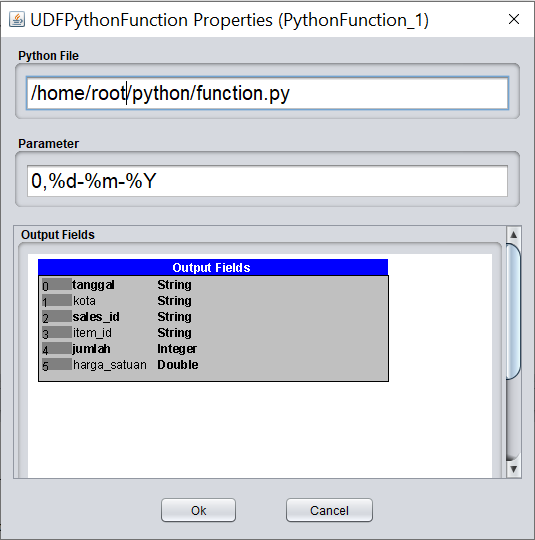
    from datetime import datetime

    def operate(list) :
            global index, format
            output=[]
            count=0
            while (count<len(list)) :
                    if (count==index):
                            date_input=list[count]
                            datetimeobject = datetime.strptime(date_input,'%Y-%m-%d')
                            new_format = datetimeobject.strftime(format)
                            output.append(new_format)
                    else :
                            output.append(list[count])
                    count=count+1

            return output


    def prepare(param) :
            global index, format
            arr_param=param.split(',')
            index=int(arr_param[0])
            format=arr_param[1]
    from datetime import datetime
    class DateFunction(HGridFunction):
            def __init__(self,param):
                    arr_param = param.split(',')
                    self.index=int(arr_param[0])
                    self.format=arr_param[1]

            def operate(self,list) :
                    output=[]
                    count=0
                    while (count<len(list)) :
                            if (count==self.index):
                                    date_input=list[count]
                                    datetimeobject = datetime.strptime(date_input,'%Y-%m-%d')
                                    new_format = datetimeobject.strftime(self.format)
                                    output.append(new_format)
                            else :
                                    output.append(list[count])
                            count=count+1

                    return output
| Map Reduce |
Spark 1.x RDD |
Spark 2.x RDD |
Spark 2.x Dataset |
Apache Beam 2.29.0 Batch |
Apache Beam 2.29.0 Streaming |
Apache Flink 1.12.0 Batch |
Apache Flink 1.12.0 Streaming |
Apache Tez 0.9.1 |
PySpark |
|---|---|---|---|---|---|---|---|---|---|
 |
|
|
|
|
|
|
|
|
 |
hadoop jar workshop_mr.jar workshop.python.TestPython -libjars /root/jython-standalone-2.7.3.jar
On spark job :
spark-submit --class workshop.python.TestPython --master yarn --jars /root/jython-standalone-2.7.3.jar workshop_spark2.jar
On Flink job :
flink run -c workshop.python.TestPython --classpath file:///root/jython-standalone-2.7.3.jar -j workshop_flink.jar --hfs_source_1 file:///D:/hgrid/input/sample_data --hfs_sink_1 file:///D:/hgrid/test/python_out
On Beam job Direct-Runner on Windows :
java -cp workshop_beam.jar;D:\BigDataTool\HGrid247-3.5\BeamRunner\direct-runner/*;D:\jython\jython-standalone-2.7.3.jar workshop.python.TestPython --hfs_source_1=D:/hgrid/input/sample_data --hfs_sink_1=D:/hgrid/test/python_out
On Beam job Direct-Runner on Linux :
java -cp workshop_beam.jar:/root/HGrid247-3.5/BeamRunner/direct-runner/*:/root/jython/jython-standalone-2.7.3.jar workshop.python.TestPython --hfs_source_1=/root/hgrid/input/sample_data --hfs_sink_1=/root/hgrid/test/python_out