
|
|
Window Partition |
AVG(sales) OVER (PARTITION BY dealer_id)
It means:
Field,Operations,Values Separator
sales:profit
    Operation       Function
    --------------------------
    Average         Rate-rate
    Sum             Total
    Count           Number of rows
    Min             Minimum value
    Max             Maximum value
    Median          Median
    StdDev          Sample standard deviation
    StdDevPop       Population standard deviation
Can multi-operate → separate with :
average:sum:count
|
    emp_name            dealer_id   sales
    -------------------------------------
    Kameko French       2           16233
    Ursa George         3           15427
    Ferris Brown        1           19745
    Noel Meyer          1           19745
    Abel Kim            3           12369
    Raphael Hull        1           8227
    Jack Salazar        1           9710
    May Stout           3           9308
    Haviva Montoya      2           9308
dealer_id
Buffer Parameter :
sales,averageOutput :
    emp_name_new        dealer_id_new   sales_new       value
    -----------------------------------------------------------
    Ferris Brown 	1               19745.0         14356.75
    Noel Meyer   	1               19745.0         14356.75
    Raphael Hull 	1               8227.0          14356.75
    Jack Salazar 	1               9710.0          14356.75
    Kameko French	2               16233.0         12770.5
    Haviva Montoya	2               9308.0          12770.5
    Ursa George  	3               15427.0         12368.0
    Abel Kim     	3               12369.0         12368.0
    May Stout    	3               9308.0          12368.0
dealer_id
Buffer Parameter :
sales,average:sumOutput :
    emp_name_new        dealer_id_new   sales_new       value
    --------------------------------------------------------------------
    Ferris Brown 	1               19745.0         14356.75,57427.0
    Noel Meyer   	1               19745.0         14356.75,57427.0
    Raphael Hull 	1               8227.0          14356.75,57427.0
    Jack Salazar 	1               9710.0          14356.75,57427.0
    Kameko French	2               16233.0         12770.5,25541.0
    Haviva Montoya	2               9308.0          12770.5,25541.0
    Ursa George  	3               15427.0         12368.0,37104.0
    Abel Kim     	3               12369.0         12368.0,37104.0
    May Stout    	3               9308.0          12368.0,37104.0
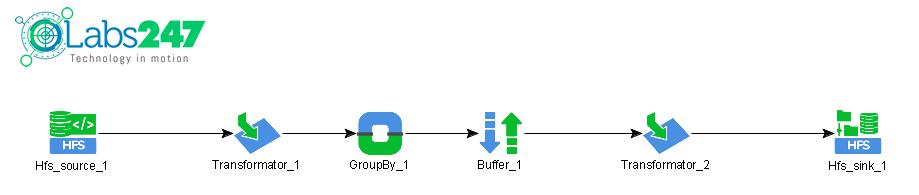
| Input Path | : | Arg[0] |
| File Type | : | Hfs |
| Combine Input | : | false |
| Fields in Lower Case | : | false |
| Delimiter | : |
| Input Field | Operation | Output Field | Type |
|---|---|---|---|
| line |
RegexSplitter(Splitter=|) |
emp_name dealer_id sales |
String String String |
| Input Field | Buffer Operation | Output Field | Type |
|---|---|---|---|
|
emp_name dealer_id sales |
WindowPartition(sales,average:sum) |
emp_name dealer_id sales emp_name_new dealer_id_new sales_new VALUE |
String Integer Double String Integer Double String |
| Input Field | Operation | Output Field | Type |
|---|---|---|---|
| emp_name_new | No Operation | emp_name_new | String |
| dealer_id_new | No Operation | dealer_id_new | Integer |
| sales_new | No Operation | sales_new | Double |
| VALUE | No Operation | VALUE | String |
| Fields Name | : | emp_name_new,dealer_id_new,sales_new,VALUE |
| Output Path | : | Arg[1] |
| Output Name | : | hgrid247-##### |
| Sink Mode | : | SinkMode.REPLACE |
| Partition Field(s) | : | |
| Splitter | : | |
| Index | : |