This Aggregation Function is used to call a User Defined Aggregation (UDF Aggregation) that is implemented as a subclass of:
com.solusi247.function.AggregationFunction247
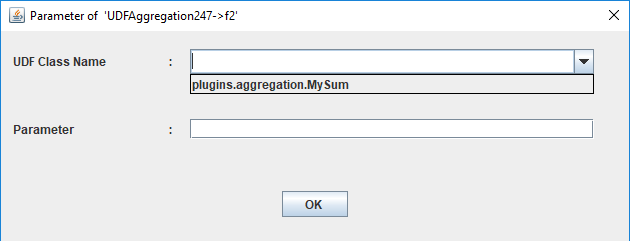
The UDFAggregation247 component requires two parameters:
- UDF Class Name
The name of the class that extends com.solusi247.function.AggregationFunction247.
- Parameter
A parameter value passed to the UDF aggregation class.
Creating a UDF Aggregation Class
To create a custom aggregation function, you must:
- Create a Java class that extends:
com.solusi247.function.AggregationFunction247
- Implement the following three abstract methods:
- call(Comparable data)
public abstract void call(Comparable data);
Called for every incoming data value.
Used to process each input record.
- getOutput()
public abstract Comparable getOutput();
Called when the aggregation result must be emitted.
Returns the final aggregated value.
- cleanup()
public abstract void cleanup();
Called after each group of data is processed.
Used to reset variables.
Inherited Methods from AggregationFunction247
The class also provides several useful methods:
- public String getParameter()
Returns the parameter passed to the aggregation object.
- public int getInputField()
Returns the index of the input field.
- public int getOutputField()
Returns the index of the output field.
- public int getInputFieldType()
Returns the data type of the input field.
- public int getOutputFieldType()
Returns the data type of the output field.
- public List<String> getIncomingFields()
Returns the list of field names from the incoming record.
Supported Field Types
Input and output fields can use the following types:
    FieldType.STRING
    FieldType.BYTE
    FieldType.SHORT
    FieldType.INT
    FieldType.LONG
    FieldType.FLOAT
    FieldType.DOUBLE
    FieldType.DATE
    FieldType.TIMESTAMP
    FieldType.OBJECT
Example: UDF Aggregation (Sum Function)
Below is an example of a custom aggregation that calculates the sum of numeric values.
   package plugins.aggregation;

    import com.solusi247.function.AggregationFunction247;


    public class MySum extends AggregationFunction247 {

        double sum=0;

        @Override
        public void call(Comparable data) {
            try{
                sum=sum+Double.parseDouble(data.toString());
            }catch(Exception e){

            }
        }

        @Override
        public Comparable getOutput() {
            return sum;
        }

        @Override
        public void cleanup() {
            sum=0;
        }

    }
How the Example Works
- Variable Initialization
double sum = 0;
- Processing Each Data Value
The call() method adds the incoming value to sum.
Example input values:
    10
    15
    5
Processing:
sum = 10 + 15 + 5 = 30
- Returning the Result
getOutput()
Returns:
30
- Reset After Processing
cleanup()
Resets:
sum = 0
so the next group starts with a clean state.
Deploying the UDF Aggregation
To make the aggregation function appear in HGrid247 GUI:
- Compile the Java class.
- Package it into a JAR file.
- Place the JAR file into the plugins folder.
Example structure:
    HGrid247-3.5/
    ├── plugins/
    │     └── MySum.jar
After restarting HGrid247, the aggregation function will appear in the Aggregation Parameter dialog.
Required Dependency
Java-based plug-ins require the following library:
    HGrid247-3.5/
    ├── libCommon/
    │     └──  HGrid247CommonLib-3.5.jar
