UDFTransform247 is a transformation function used to run User Defined Transformation (UDF) on HGrid247 workflow.
This function allows users to create custom data transformation logic using Java.
This transformation is called via the Transformer or Transformer2 assembly in the workflow.
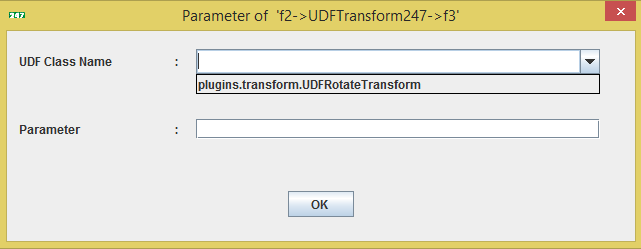
Parameters Used by UDFTransform247
There are two main parameters used.
- UDF Class Name
The name of a Java class that is a subclass of:
com.solusi247.function.TransformationFunction247
Example:
plugins.transform.UDFRotateTransform
- Parameter
Additional parameters passed to the UDF class.
This parameter can be accessed via the method:
getParameter ()
UDF Transformation Class Requirements
To be used in HGrid247, a UDF class must:
Extend abstract class
com.solusi247.function.TransformationFunction247
Implementing the main method
public abstract List<Comparable> call(List<Comparable> record)
This method works for:
- receive input records
- carry out transformation
- return the transformation results
Important Inherited Methods
UDF classes also inherit some important methods from their superclasses.
- public String getParameter()
Used to retrieve parameters given to a UDF.
- public List<Comparable> call(Comparable data)
Used to transform a single data object
- public List<Comparable> getIncomingRecord()
Restores the original record from the previous assembly .
- public int[] getInputFields()
Returns the index of the input field.
- public int[] getOutputFields()
Returns the data type of the output field.
- public byte[] getInputFieldsType()
return array type of input
- public byte[] getOutputFieldsType()
return array type of output
- public List<String> getIncomingFields()
return the list of field's names of incoming record
Field Data Types
Fields in UDFTransform247 can have the following data types:
    FieldType.STRING
    FieldType.BYTE
    FieldType.SHORT
    FieldType.INT
    FieldType.LONG
    FieldType.FLOAT
    FieldType.DOUBLE
    FieldType.DATE
    FieldType.TIMESTAMP
    FieldType.OBJECT
This type is used to determine the input and output field types.
Example UDF Transformation Class
Here is an example of a transformation class that reverses the text in each field.
    package plugins.transform;

    import com.solusi247.function.TransformationFunction247;
    import java.util.ArrayList;
    import java.util.List;


    public class UDFRotateTransform extends TransformationFunction247{

        @Override
        public List<Comparable> call(List<Comparable> record) {
            List<Comparable> list=new ArrayList<Comparable>();
            for (int i=0; i<record.size(); i++){
                StringBuilder sb=new StringBuilder(record.get(i).toString());
                list.add(sb.reverse().toString());
            }

            return list;
        }
    }
Explanation of Example
The program performs the following steps:
- Receives input records in the formList<Comparable>
- Iterate over each field
- Use StringBuilder.reverse() to reverse a string
- Save the results in the output list
- Returns a list as the result of the transformation.
Compile and Deploy UDF Transformation
To make the transformation appear in the HGrid247 GUI, do the following steps.
- Compile Java Class
Compile using the HGrid247 library:
javac -cp HGrid247CommonLib-3.5.jar UDFRotateTransform.java
- Create JAR File
Create a JAR file:
jar cvf udfrotate.jar plugins/transform/UDFRotateTransform.class
- Copy to Plugins Folder
Save the jar file in the folder:
HGrid247-3.5/plugins
- Restart HGrid247
After restart, the transformation class will appear in the transformation parameters dialog