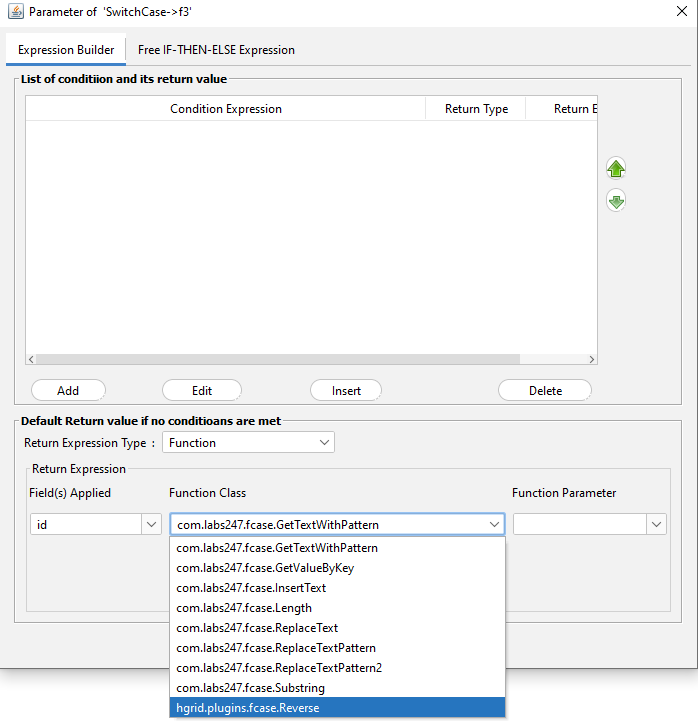
In HGrid247, SwitchCase Transformation is used to create branching logic (conditional processing) on data.
To extend the capabilities of SwitchCase, users can create custom Function Operations using Java-based User Defined Functions (UDFs) .
This function is created by subclassing the abstract class:
com.labs247.function.SwitchCaseFunction247
UDF Class Requirements
The class created must:
- Extend class
com.labs247.function.SwitchCaseFunction247
- Implementing the main method
public abstract Comparable transform(List<Comparable> current_record);
This method is used to:
- receive input records
- carry out transformation
- returns the transformation result as a single value (Comparable)
Inherited Methods
This UDF class also inherits several methods from the superclass SwitchCaseFunction247.
- public String getParameter()
takes the parameters passed to the function.
- public void prepare()
- called after the object is created
- used for variable initialization or initial configuration
- public List<String> getIncomingFields()
returns a list of field names from the input record.
- public List<Comparable> getIncomingRecord()
eturns the input record currently being processed.
Example UDF Function Operation
The following is an example of the implementation of the UDF Function Operation which reverses the text in the first field.
   package hgrid.plugins.fcase;

   import com.labs247.function.SwitchCaseFunction247;
   import java.util.List;

   public class Reverse extends SwitchCaseFunction247{

      @Override
      public Comparable transform(List<Comparable> current_record) {
          StringBuilder sb=new StringBuilder(current_record.get(0).toString());
          return sb.reverse().toString();
      }
   }
Explanation of Example
The above program performs the following processes:
- Receives input records in the formList<Comparable>
- Take the first field:
current_record.get(0)
- Use StringBuilderto reverse a string:
sb.reverse()
- Returns the result as an output value.
Deploying the UDF Plugin
To make this function usable in the HGrid247 GUI, perform the following steps.
- Compile Java Class
Compile using the HGrid247 library:
javac -cp HGrid247CommonLib-3.5.jar Reverse.java
- Create JAR File
Create a jar file:
jar cvf switchcase-plugin.jar hgrid/plugins/fcase/Reverse.class
- Copy JAR to Plugins Folder
Save the jar file in the folder:
HGrid247-3.5/plugins
- Restart HGrid247
After restart, the class will appear in the SwitchCase Function Transformation parameter dialog .