This aggregation function is used to invoke a Python-based aggregation.
Parameters Used by UDFPythonAggregation247
- Python File
The file path containing the Python code.
In a Hadoop YARN environment, this path must be located in the Hadoop Distributed File System (HDFS).
- Parameter
The parameter value that will be passed to the Python code.
Sample of the UDFPythonAggregation247 Parameters Dialog in HGrid247-3.5
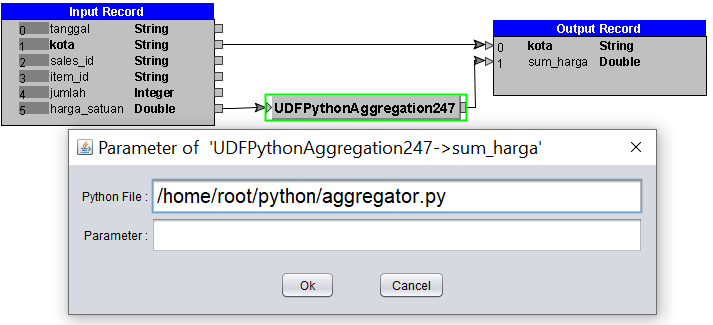
The Python code specified in the Python File may be written in either procedural or object-oriented programming style.
1. Procedural Programming Style
In procedural programming style, the Python code must define a function named
receive.
- The receive function takes two parameters:
- a list of objects, and
- the index of the selected item in the input list.
- The receive function is called for each iteration within a group of records.
- The Python code must also define a function named complete, which takes no parameters.
- The complete function is called after all iterations in a group of records have been completed.
- This function returns an object representing the aggregation result.
Optionally, the Python code may also define a function named
prepare that takes one parameter.
The
prepare function is invoked by HGrid247 during the startup process.
Example of Python Code Used in an Aggregation Function (Procedural Programming Style)
    output=0
    counter=0
    def receive(list,index) :
            global output,counter
            output=output+(list[index]*list[4])
            counter=counter+1

    def complete():
            global output,counter
            result=output/counter
            output=0
            counter=0
            return result
2. Object-Oriented Programming Style
In object-oriented programming style, the Python code must define a class that inherits from
HGridAggregation.
- The class must define a constructor that takes a single string parameter.
- The class must override the parent class’s receive method, which takes two parameters:
- a list of objects, and
- an integer representing the index of the selected element in the list.
This method is called for each iteration within a group of records.
- The class must also override the parent class’s complete method, which:
- takes no parameters,
- is called after all iterations in a group of records have been completed, and
- returns an object representing the aggregation result.
Example of Python Code Used in an Aggregation Function (Object-Oriented Programming Style)
    class SumAggregation(HGridAggregation):
            def __init__(self,parameter):
                    self.parameter=parameter
                    self.output=0
                    self.counter=0

            def receive(self,list,index) :
                    self.output=self.output+(list[index]*list[4])
                    self.counter=self.counter+1

            def complete(self):
                    result=self.output/self.counter
                    self.output=0
                    self.counter=0
                    return result
Note: Do not forget to include the Jython library (jython-standalone-2.7.3.jar) when submitting the job.
On mapreduce job :
hadoop jar <project-name>_mr.jar ClassToRun -libjars <JYTHON-PATH>/jython-standalone-2.7.3.jar input output
For example :
hadoop jar workshop_mr.jar workshop.python.TestPython -libjars /root/jython-standalone-2.7.3.jar
On spark job :
spark-submit --class ClassToRun --master yarn --jars <JYTHON-PATH>/jython-standalone-2.7.3.jar <project-name>_spark2.jar input output
For example :
spark-submit --class workshop.python.TestPython --master yarn --jars /root/jython-standalone-2.7.3.jar workshop_spark2.jar
On Flink job :
flink run -c ClassToRun --classpath file:///<JYTHON-PATH>/jython-standalone-2.7.3.jar -j <project-name>_flink.jar --input_option input_path --output_option output_path
For example :
flink run -c workshop.python.TestPython --classpath file:///root/jython-standalone-2.7.3.jar -j workshop_flink.jar --hfs_source_1 file:///D:/hgrid/input/sample_data --hfs_sink_1 file:///D:/hgrid/test/python_out
On Beam job Direct-Runner on Windows :
java -cp <project-name>_beam.jar;<HGridApp-Path>\HGrid247-3.5\BeamRunner\direct-runner/*;<JYTHON-PATH>\jython-standalone-2.7.3.jar ClassToRun --input_option=input_path --output_option=output_path
For example :
java -cp workshop_beam.jar;D:\BigDataTool\HGrid247-3.5\BeamRunner\direct-runner/*;D:\jython\jython-standalone-2.7.3.jar workshop.python.TestPython --hfs_source_1=D:/hgrid/input/sample_data --hfs_sink_1=D:/hgrid/test/python_out
On Beam job Direct-Runner on Linux :
java -cp <project-name>_beam.jar:<HGridApp-Path>/HGrid247-3.5/BeamRunner/direct-runner/*:<JYTHON-PATH>/jython-standalone-2.7.3.jar ClassToRun --input_option=input_path --output_option=output_path
For example :
java -cp workshop_beam.jar:/root/HGrid247-3.5/BeamRunner/direct-runner/*:/root/jython/jython-standalone-2.7.3.jar workshop.python.TestPython --hfs_source_1=/root/hgrid/input/sample_data --hfs_sink_1=/root/hgrid/test/python_out
