Number of input and output field
| Number of input field |
: |
One or more |
| Number of output field |
: |
One or more |
This transformation function is used to invoke a Python code transformation.
Parameters Used by UDFPythonTransform247.
- Python File
The file path that contains the Python code.
In a Hadoop YARN environment, this path must be located in the Hadoop Distributed File System (HDFS).
- Parameter
The parameter value that will be passed to the Python code.
Sample of UDFPythonTransform247 Parameters Dialog in HGrid247-3.5
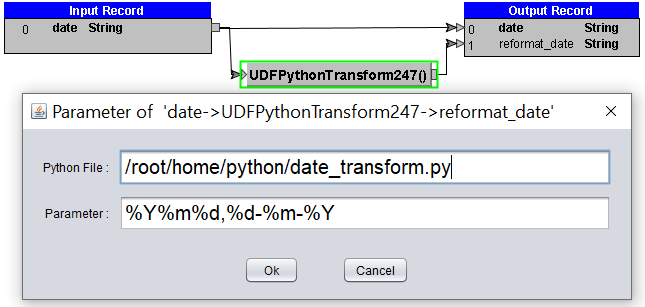
The Python code specified in the Python File can be written in either procedural or object-oriented programming style.
1. Procedural Programming Style
In procedural programming style, the Python code must define a function named
transform.
- The transform function takes two parameters:
- The first parameter is a list of objects.
- The second parameter is a list of integers representing the indices of selected elements from the first parameter.
- The transform function returns either a single object or a list of objects and is invoked by HGrid247 for each record during the transformation process.
Optionally, the Python code may also define a function named
prepare with a single string parameter.
The prepare function is invoked by HGrid247 during the startup process.
Example of Python Code Transformation Function (Procedural Programming Style)
    from datetime import datetime
    def transform(list,idx) :
            global input_format,output_format
            date_input=list[idx[0]]
            datetimeobject = datetime.strptime(date_input,input_format)
            new_format = datetimeobject.strftime(output_format)
            return new_format

    def prepare(param) :
            global input_format,output_format
            arr_format = param.split(',')
            input_format=arr_format[0]
            output_format=arr_format[1]
2. Object Oriented Programming Style
In object-oriented programming style, the Python code must define a class that inherits from
HGridTransformation.
- The class must define a constructor that takes a single string parameter.
- The class must override the parent class’s transform method, which takes two parameters:
- The first parameter is a list of objects.
- The second parameter is a list of integers representing the indices of selected elements from the first parameter.
- The transform method returns either a single object or a list of objects and is invoked by HGrid247 for each record during the transformation process.
Example of python-code transformation-function in object oriented programming style :
    from datetime import datetime
    class DateTransform(HGridTransformation):
            def __init__(self,param):
                    arr_format = param.split(',')
                    self.input_format=arr_format[0]
                    self.output_format=arr_format[1]

            def transform(self,list,idx) :
                    date_input=list[idx[0]]
                    datetimeobject = datetime.strptime(date_input,self.input_format)
                    new_format = datetimeobject.strftime(self.output_format)
                    return new_format
Note: Do not forget to include the Jython library (jython-standalone-2.7.3.jar) when submitting the job.
On mapreduce job :
hadoop jar <project-name>_mr.jar ClassToRun -libjars <JYTHON-PATH>/jython-standalone-2.7.3.jar input output
For example :
hadoop jar workshop_mr.jar workshop.python.TestPython -libjars /root/jython-standalone-2.7.3.jar
On spark job :
spark-submit --class ClassToRun --master yarn --jars <JYTHON-PATH>/jython-standalone-2.7.3.jar <project-name>_spark2.jar input output
For example :
spark-submit --class workshop.python.TestPython --master yarn --jars /root/jython-standalone-2.7.3.jar workshop_spark2.jar
On Flink job :
flink run -c ClassToRun --classpath file:///<JYTHON-PATH>/jython-standalone-2.7.3.jar -j <project-name>_flink.jar --input_option input_path --output_option output_path
For example :
flink run -c workshop.python.TestPython --classpath file:///root/jython-standalone-2.7.3.jar -j workshop_flink.jar --hfs_source_1 file:///D:/hgrid/input/sample_data --hfs_sink_1 file:///D:/hgrid/test/python_out
On Beam job Direct-Runner on Windows :
java -cp <project-name>_beam.jar;<HGridApp-Path>\HGrid247-3.5\BeamRunner\direct-runner/*;<JYTHON-PATH>\jython-standalone-2.7.3.jar ClassToRun --input_option=input_path --output_option=output_path
For example :
java -cp workshop_beam.jar;D:\BigDataTool\HGrid247-3.5\BeamRunner\direct-runner/*;D:\jython\jython-standalone-2.7.3.jar workshop.python.TestPython --hfs_source_1=D:/hgrid/input/sample_data --hfs_sink_1=D:/hgrid/test/python_out
On Beam job Direct-Runner on Linux :
java -cp <project-name>_beam.jar:<HGridApp-Path>/HGrid247-3.5/BeamRunner/direct-runner/*:<JYTHON-PATH>/jython-standalone-2.7.3.jar ClassToRun --input_option=input_path --output_option=output_path
For example :
java -cp workshop_beam.jar:/root/HGrid247-3.5/BeamRunner/direct-runner/*:/root/jython/jython-standalone-2.7.3.jar workshop.python.TestPython --hfs_source_1=/root/hgrid/input/sample_data --hfs_sink_1=/root/hgrid/test/python_out
