Number of input and output field
| Number of input field |
: |
One or more |
| Number of output field |
: |
One or more |
This Transformation Function is used to call a User-Defined Transformation (UDF Transformation).
The UDF must be implemented as a subclass of:
com.solusi247.function.TransformationFunction247
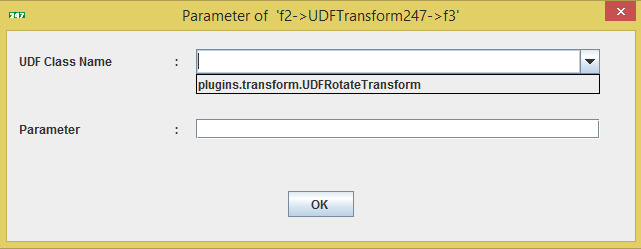
Parameters Used by UDFTransform247
There are two parameters required when using a UDF Transformation:
- UDF Class Name
The name of the class that extends:
com.solusi247.function.TransformationFunction247
Example:
plugins.transform.UDFRotateTransform
- Parameter
A parameter value that will be passed to the UDF class and can be accessed using the getParameter() method.
UDF Transformation Class Requirements
To create a custom transformation function, the class must:
- Extend the abstract class
com.solusi247.function.TransformationFunction247
- Implement the following method
public abstract List<Comparable> call(List<Comparable> record)
This method:
- Receives one input record
- Processes the data
- Returns a transformed record
Inherited Methods
A UDF transformation class also inherits several useful methods from:
com.solusi247.function.TransformationFunction247
- public String getParameter()
Returns the parameter passed to the UDF.
- public List<Comparable> call(Comparable data)
Transforms a single Comparable object.
- public List<Comparable> getIncomingRecord()
Returns the original record received from the previous assembly.
- public int[] getInputFields()
Returns the indices of the input fields.
Example:
[0,2]
- public int[] getOutputFields()
Returns the indices of the output fields.
- public byte[] getInputFieldsType()
Returns the data types of input fields.
- public byte[] getOutputFieldsType()
Returns the data types of output fields.
- public List<String> getIncomingFields()
Returns the list of field names from the incoming record.
Supported Field Types
Input and output fields can use the following data types:
    FieldType.STRING
    FieldType.BYTE
    FieldType.SHORT
    FieldType.INT
    FieldType.LONG
    FieldType.FLOAT
    FieldType.DOUBLE
    FieldType.DATE
    FieldType.TIMESTAMP
    FieldType.OBJECT
Example: UDF Transformation Class
Below is an example of a transformation that reverses the characters of each field in a record.
Java Code Example
    package plugins.transform;

    import com.solusi247.function.TransformationFunction247;
    import java.util.ArrayList;
    import java.util.List;


    public class UDFRotateTransform extends TransformationFunction247{

        @Override
        public List<Comparable> call(List<Comparable> record) {
            List<Comparable> list=new ArrayList<Comparable>();
            for (int i=0; i<record.size(); i++){
                StringBuilder sb=new StringBuilder(record.get(i).toString());
                list.add(sb.reverse().toString());
            }

            return list;
        }
    }
How This Transformation Works
Example input record:
["Jakarta", "HGrid247", "Data"]
Processing:
- "Jakarta" → "atrakaJ"
- "HGrid247" → "742dirGH"
- "Data" → "ataD"
Output record:
["atrakaJ", "742dirGH", "ataD"]
Deploying the UDF Transformation
To make the transformation appear in the HGrid247 GUI:
Step 1 — Compile the Java class
Compile the source file:
UDFRotateTransform.java
Step 2 — Package into a JAR
Example:
UDFRotateTransform.jar
Step 3 — Place in the plugins folder
    HGrid247-3.5/
    ├── plugins/
    │     └── UDFRotateTransform.jar
Step 4 — Restart HGrid247
After restarting, the UDF will appear in the Transformation Parameter dialog.
Required Dependency
Java-based plug-ins require the following library:
    HGrid247-3.5/
    ├── libCommon/
    │     └──  HGrid247CommonLib-3.5.jar
