UDF Event Time Assigner is used by Event Time Assigner Assembly to assign the Event Time of the current data record.
This allows developers to create their own logic for determining the event time of incoming data.
Creating a UDF Event Time Assigner
To create a custom Event Time Assigner, you must create a subclass of:
com.labs247.function.EventTimeAssigner
This abstract class contains one required method that must be implemented.
Required Abstract Method
public abstract long extractEventTime(List<Comparable> current_record)
Purpose
This method extracts the event time (in milliseconds) from the current record and assigns it as the Event Time of that record.
Parameter
current_record
A list containing all fields of the current data record.
Return
long value representing time in milliseconds.
Inherited Methods
- public String getParameter()
Returns the parameter passed to the Event Time Assigner.
- public void open()
This method is called after the object is created.
It is usually used to initialize variables or resources.
- public void close()
This method is called when the object is destroyed.
It is used to release resources.
The class EventTimeAssigner provides several methods that can be used in the subclass.
Example: Custom Event Time Assigner
The following example extracts Event Time from the first field of the record.
The field contains a date string which will be converted to milliseconds.
package hgrid.plugins.et;

import com.labs247.function.EventTimeAssigner;
import java.text.SimpleDateFormat;
import java.util.Date;
import java.util.List;


public class MyEventTime extends EventTimeAssigner {

    SimpleDateFormat dateFormat;

    public long extractEventTime(List<Comparable> current_record) {
        String element_1=current_record.get(0).toString();
        try{
           Date date=dateFormat.parse(element_1);
           return date.getTime();
        }catch(Exception e){
           return System.currentTimeMillis();
        }
    }
    @Override
    public void open() {
       dateFormat=new SimpleDateFormat(this.getParameter());
    }

}
Explanation of the Example
Step 1 — Read the first field
String element_1 = current_record.get(0).toString();
The first column of the record is assumed to contain a date string.
Example:
2026-02-07 12:45:10
Step 2 — Convert the date string into a Date object
Date date = dateFormat.parse(element_1);
The format is determined using the parameter passed to the function.
Example parameter:
yyyy-MM-dd HH:mm:ss
Step 3 — Convert Date into milliseconds
return date.getTime();
The system converts the date into Unix time in milliseconds, which is required by HGrid.
Step 4 — Handle errors
    catch(Exception e){
        return System.currentTimeMillis();
    }
If parsing fails, the system assigns the current system time.
Step 5 — Initialize the Date Format
dateFormat = new SimpleDateFormat(this.getParameter());
This is done inside the open() method.
Example parameter passed in HGrid:
yyyy-MM-dd HH:mm:ss
Deploying the Plugin in HGrid247
To make this class appear in HGrid247 GUI:
Step 1
Compile the Java class.
Step 2
Package it into a JAR file.
Example:
MyEventTime.jar
Step 3
Place the JAR file in the plugins folder:
    HGrid247-3.5/
    ├── plugins/
    │     └──  MyEventTime.jar
Step 4
Restart HGrid247 GUI.
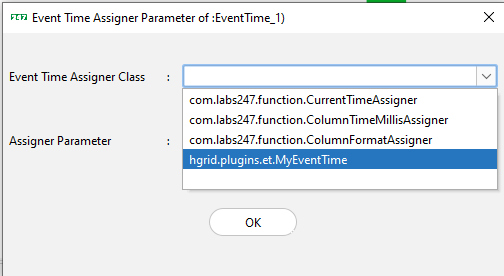
The class MyEventTime will now appear as an available Event Time Assigner Assembly.
Required Dependency
Java-based plug-ins require the following library:
    HGrid247-3.5/
    ├── libCommon/
    │     └──  HGrid247CommonLib-3.5.jar
