User Defined Function/Operation (

) in HGrid247-3.5 is used to create custom data processing functions that are not available in standard operators.
This function is used in the UDF Function/Operation assembly to process each data record that enters the workflow.
To create a UDF in HGrid247, we have to create a Java class which is a subclass of the abstract class :
com.solusi247.function.Function247
This class provides several methods used in data processing.
Methods in Function247
Class Function247has several important methods that must be understood.
- public abstract void operate(List<Comparable> record)
This method is the main method that is called for each data record received.
Parameter:
-
record→ list of fields of the data record being processed
Function:
- perform data transformation or manipulation
- generate output records
- public String getParameter()
This method is used to retrieve parameters given to a UDF .
Usually used for:
- function configuration
- determine processing logic
- public void prepare()
This method is called after the UDF object is created .
Usually used for:
- variable initialization
- open connection
- read initial configuration
- public void cleanup()
This method is called after all records have been processed .
Usually used for:
- close the connection
- clean up resources
- public final void addToOutputCollector(List<Comparable> record)
This method is used to send the processing result record to the workflow output .
- public List<String> getIncomingFields()
This method is used to get a list of field names from an input record .
Example UDF Function (Reverse)
The following is an example of a UDF implementation used to reverse text in a specific field .
    package plugins.function;

    import com.solusi247.function.Function247;
    import java.util.ArrayList;
    import java.util.List;


    public class Reverse extends Function247{

        @Override
        public void operate(List<Comparable> list) {

            ArrayList<Comparable> list_out=new ArrayList<>();
            for (int i=0; i<list.size(); i++){
                if (i==5){
                    StringBuilder sb=new StringBuilder(list.get(i).toString());
                    list_out.add(sb.reverse().toString());
                }else{
                    list_out.add(list.get(i));
                }
            }
            this.addToOutputCollector(list_out);
        }
    }
Explanation of the Example
The above program performs the following processes:
- Receive input records in the form ofList<Comparable>
- Create a new output list
- Iterate over each field
- If the field index = 5 , then the field value is reversed using:
StringBuilder.reverse()
Example:
    Input : "Jakarta"
    Output : "atrakaJ"
Other fields remain the same
Output records are sent using:
addToOutputCollector()
Compile and Deploy UDF
To make the UDF function appear in the HGrid247 GUI , do the following steps.
- Compile Java Class
Compile the class using the HGrid247 library:
javac -cp HGrid247CommonLib-3.5.jar Reverse.java
- Create JAR File
Create a jar file:
jar cvf reverse-plugin.jar plugins/function/Reverse.class
- Copy JAR to Plugins Folder
Simple file jar ke folder:
HGrid247-3.5/plugins
- Restart HGrid247
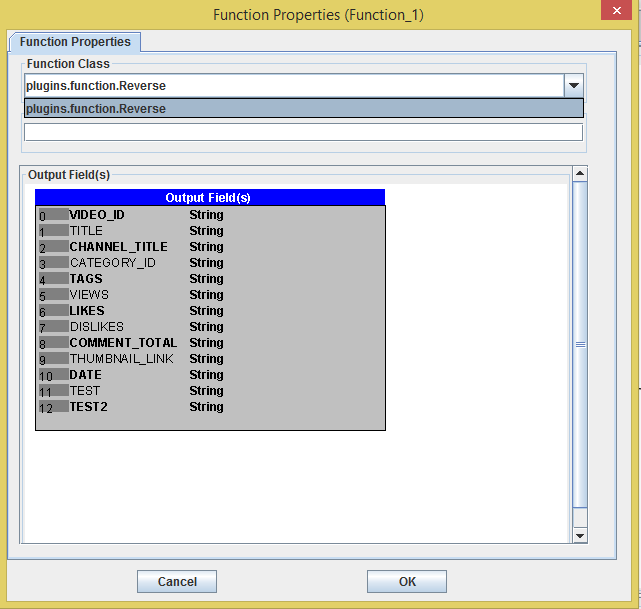
After restart, the Reverse function will appear on:
UDF Function / Operation Assembly
Example Use Case
Example of using Reverse UDF:
Input Dataset
    id,name,age,city,salary,comment
    1,Andi,25,Jakarta,5000,HelloWorld
Workflow
    HFS Source
          ↓
    UDF Function (Reverse)
          ↓
    HFS Sink
Output Dataset
1, Andi, 25, Jakarta, 5000, dlroWolleH
Advantages of UDF Function
Using UDFs provides several advantages:
- Custom Data Processing
Allows to create own processing logic.
- Flexible Transformation
Can perform complex data transformations.
- Reusable Components
Functions can be reused in multiple workflows.
- Extend HGrid247 Capability
Extends HGrid247 processing capabilities beyond the standard operators.
