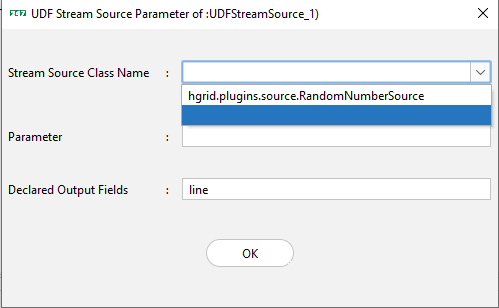
A User Defined Stream Source is a Java-based User Defined Function (UDF) that generates a stream of data records which can be used by the UDF Stream Source Assembly in HGrid247.
Creating a User Defined Stream Source
To create a custom stream source, you must:
Methods Available in StreamSource
The class com.labs247.function.StreamSource provides several inherited methods:
- public abstract List<Comparable> run()
Called repeatedly to generate a new record.
Returns a List of Comparable values that represent one data record.
- public String getParameter()
Returns the parameter passed to the stream source.
- public void open()
Called after the object is created.
Usually used for initialization (e.g., opening connections).
- public void close()
Called when the object is destroyed.
Used for cleanup operations.
- public long currentEventTime()
Returns the current time in milliseconds.
Used to assign Event Time to generated records.
This method can be overridden if a custom event time is needed.
Example: Random Number Stream Source
This example generates a stream of random integers.
    package hgrid.plugins.source;

    import com.labs247.function.StreamSource;
    import java.util.ArrayList;
    import java.util.List;
    import java.util.Random;

    public class RandomNumberSource extends StreamSource {
        Random random = new Random();
        @Override
        public List <Comparable> run() {
            List<Comparable> list=new ArrayList<>();
            list.add(random.nextInt());
            return list;
        }
    }
Explanation of the Example
- The class RandomNumberSource extends StreamSource.
- A Random object generates random numbers.
- The run() method:
- Creates a new list.
- Adds a random integer to the list.
- Returns the list as a record.
- Each time run() executes, a new random number record is produced.
Example output stream:
    1034
    -252
    781
    912
    -64
Deploying the UDF Stream Source
To make the custom source appear in the HGrid247-3.5 GUI:
- Compile the Java class.
- Package it into a JAR file.
- Place the JAR file inside the plugins folder.
    HGrid247-3.5/
    ├── plugins/
    │     └── RandomNumberSource.jar
After restarting HGrid247, the UDF Stream Source will be available in the GUI.