A Custom Buffer Transformation allows you to create your own buffer-processing logic when working with grouped data streams.
To create one, you must create a Java class that extends:
com.solusi247.function.BufferTransformation247
Required Methods
When creating a custom buffer transformation, you must implement three main methods:
- public void start()
Purpose:
- Initialize variables
- Reset counters or accumulators
- public void onTuple(List<Comparable> record, int index, byte type)
This method is called for every record in the group.
Parameters:
    Parameter	Description
    ------------------------------
    record	The current record
    index	Index of the field being processed
    type	Data type of the field
Typical use:
- Perform calculations
- Accumulate values
- Compare records
- Process row-by-row logic
- public Comparable getValue()
This method is called when the result must be emitted to the next assembly.
Purpose:
-
Return the final calculated value.
Inherited Methods
Classes extending BufferTransformation247 automatically inherit useful helper methods.
- void afterGroupEmit()
Called after a group result is emitted.
- void prepare()
Executed once before processing groups of records.
- void onChangeSubGroup(List<Comparable> record, int index, byte type)
Called when a sub-group changes.
- void cleanup()
Executed after processing all record groups.
- Comparable getFromTupleEntry(Comparable comp, byte type)
Utility method used to extract values from tuple entries safely.
- List<String> getIncomingFields()
Returns the list of field names from the incoming records.
Example: Custom Buffer Transformation (Accumulation)
This example calculates a running total (accumulation) for a field within a group.
Java Implementation
    package plugins.buftrans;

    import com.solusi247.function.BufferTransformation247;


    public class Accumulation extends BufferTransformation247{
        double nilai=0;
        Comparable output;

        public void start(){
            this.nilai=0;
        }

        public void onTuple(List<Comparable> record, int index, byte type) {
            double data=0;
            Comparable comp=record.get(index);
            try{
                 data=Double.parseDouble(comp.toString());
            }catch(Exception e){
                e.printStackTrace();
            }

            this.nilai=(Double)this.nilai+data;

            this.output=this.nilai;
        }

        @Override
        public Comparable getValue() {
            return this.output;
        }


    }
How This Works
Example input data:
    Customer	Amount
    ------------------
    A           10
    A           15
    A           20
Running accumulation result:
    Customer	Amount	Accumulation
    ---------------------------------
    A           10	10
    A           15	25
    A           20	45
Each row adds the value to the previous total.
Deployment in HGrid247
To make the transformation available in HGrid247 GUI:
Step 1 — Compile the Java file
Accumulation.java
Step 2 — Package into a JAR
Example:
Accumulation.jar
Step 3 — Copy to plugins folder
    HGrid247-3.5/
    ├── plugins/
    │     └── Accumulation.jar
Step 4 — Restart HGrid247
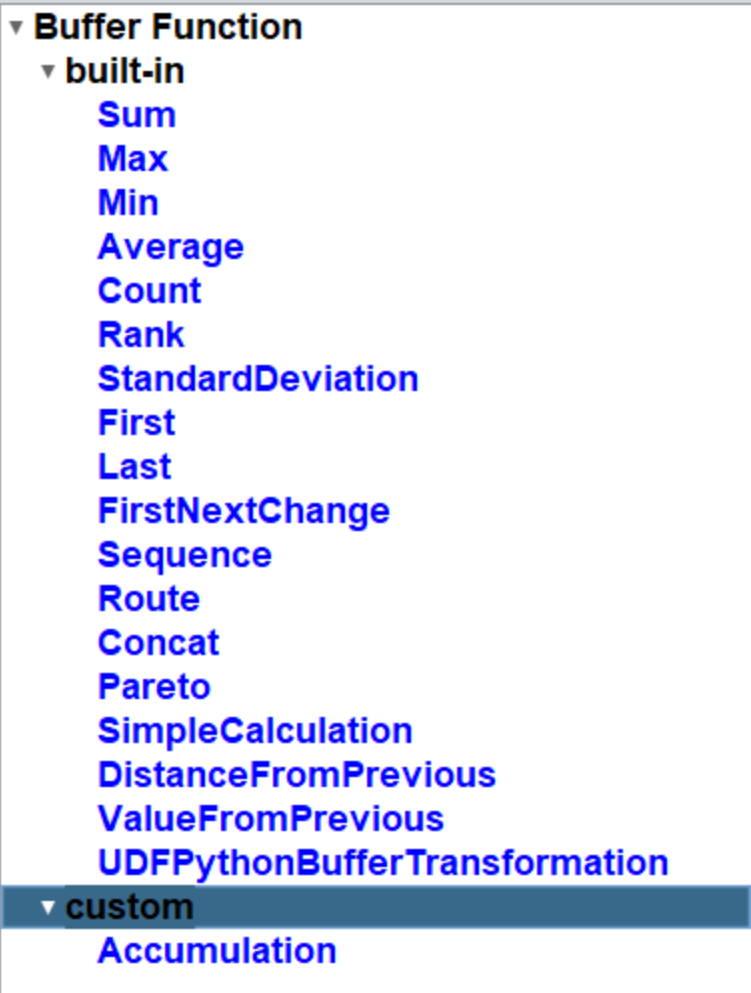
After restarting, the custom buffer transformation will appear in the Buffer Function Tree.
Required Dependency
Java-based plug-ins require the following library:
    HGrid247-3.5/
    ├── libCommon/
    │     └──  HGrid247CommonLib-3.5.jar
Typical Use Cases
Custom buffer transformations are useful for:
- Running totals
- Moving averages
- Custom ranking
- Time-series analysis
- Financial transaction aggregation
- Fraud detection scoring
