The FROM_CONFIG keyword is used to create dynamic parameters whose values are taken from the configuration file when the workflow is run (run time) .
Unlike FROM_ARGUMENT which takes parameters from the command line, FROM_CONFIG takes values from the configuration file (.conf) .
This feature allows the workflow to be more flexible and easy to configure without changing the workflow code .
Scope of Dynamic Configuration
Dynamic configuration can be used on several operators in HGrid247, namely:
Source
Examples of supported sources:
- JDBC Source
- Solr Source
- Kafka Source
- Twitter Source
- ElasticSearch Source
Assembly
Examples of supported assemblies:
- Transformation Function
- Buffer
- Function
- Filter
- Aggregation
Sink
Examples of supported Sinks:
- JDBC Sink
- Solr Sink
- Kafka Sink
- ElasticSearch Sink
Syntax of FROM_CONFIG
To create a dynamic configuration parameter named kafka.start.time , use the following format.
Format 1 (without default value)
FROM_CONFIG(kafka.start.time)
It means:
kafka.start.time value must be provided in the configuration file at run time
Format 2 (with default value)
FROM_CONFIG(kafka.start.time, 2021-03-16 00:00:00)
It means:
- If the kafka.start.time value is available in the configuration file , then that value is used.
- If not available , the system uses the default value.
Example Usage
For example, we want to determine the start time to read data from Kafka. dynamically
Parameters on Kafka Source can be written:
FROM_CONFIG(kafka.start.time, 2021-03-16 00:00:00)
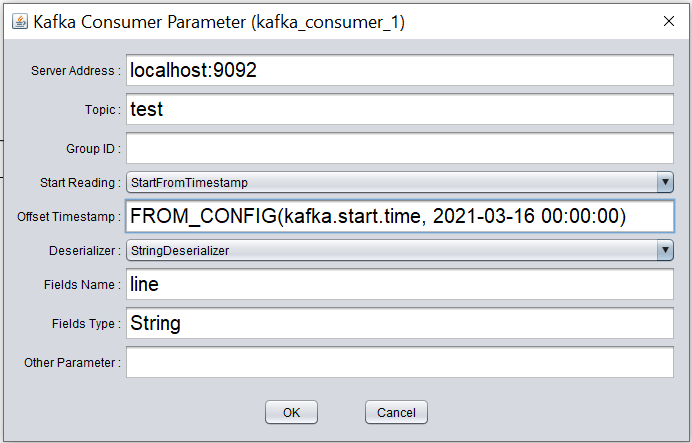
The values of these parameters will then be read from the configuration file when the workflow is run.
Configuration File
Configuration files are used to store dynamic configuration parameter values.
Format File
Usually using key-value format format .
Example of configuration file contents:
    kafka.start.time=2021-03-16 00:00:00
    kafka.topic.name=video_stream
    kafka.consumer.group=analytics_group
Configuration File Naming Convention
The configuration file name follows the format:
<package>.<WorkflowName>.conf
Example
For example workflow:
MyWorkFlow
which is in the package:
demo
So the configuration file created is:
demo.MyWorkFlow.conf
Configuration File Creation
Configuration files are usually created automatically when the workflow is compiled. .
Example:
If workflow:
demo.MyWorkFlow
compiled, then the following files will be created:
demo.MyWorkFlow.conf
This file can then be edited to change parameters without changing the workflow.
Advantages of Dynamic Configuration
Usage of FROM_CONFIG has several advantages:
- Configuration Flexibility
Parameters can be changed without changing the workflow.
- Simplify Deployment
The same workflow can be used in different environments:
- development
- testing
- production
- 3. Supports Automation
Parameters can be controlled by:
- scheduler
- script deployment
- monitoring system
- Reduce Hardcoding
Parameter values do not need to be written directly in the workflow.
FROM_ARGUMENT vs FROM_CONFIG
    Feature             FROM_ARGUMENT               FROM_CONFIG
    ------------------------------------------------------------------------
    Source parameter	Command line                Configuration file
    Run time input	Manual input                File-based
    Automation          Script / CLI                Configuration management
    Use case            Job execution parameter     Environment configuration
