Dynamic Parameters in HGrid247 are used to create parameters whose values are assigned when the workflow is run (run time) via the command line .
This feature makes the workflow more flexible because parameter values do not have to be specified during workflow design.
The keywords used are:
FROM_ARGUMENT
Dynamic parameters can be used on:
Syntax of Dynamic Parameter
To create a dynamic parameter named trans_date , use one of the following formats.
Format 1
FROM_ARGUMENT(trans_date)
In this format, parameter values must be provided when the job is run .
Format 2
FROM_ARGUMENT(trans_date, default_value)
In this format:
- if the parameter is given at run time , then the value is used
- if not given , the system uses the default_value
Example 1: Dynamic Parameter in Source
For example, we use JDBC Source to retrieve data from the employee table , but:
- field taken
- query conditions
determined when the workflow is run.
Query Statement at JDBC Source
select FROM_ARGUMENT(fields) from employee where dept_id='FROM_ARGUMENT(dept_id)'
In this example there are two dynamic parameters:
MapReduce Engine
Parameters are given when running the job:
$hadoop jar archive_mr.jar archive.ClassToRun <Input-List> <Output-List> fields=name,salary,hired_date dept_id=0004
Spark Engine
$spark-submit --class archive.ClassToRun --master yarn archive_spark2.jar <Input-List> <Output-List> fields=name,salary,hired_date dept_id=0004
Apache Beam (SparkRunner)
$spark-submit --class archive.ClassToRun --master yarn archive_beam.jar <Option-Input-List> <Option-Output-List> --runner=SparkRunner --fields=name,salary,hired_date --dept_id=0004
Apache Beam (FlinkRunner)
$flink run -c archive.ClassToRun -j archive_beam.jar <Option-Input-List> <Option-Output-List> --runner=FlinkRunner --fields=name,salary,hired_date --dept_id=0004
Apache Flink Engine
$flink run -c archive.ClassToRun -j archive_flink.jar <Option-Input-List>> <Option-Output-List> --fields name,salary,hired_date --dept_id 0004
Example 2: Dynamic Parameter in Transformation Function
For example, we want to change the number format using the DecToString function , but the number format is determined at run time.
Parameter pada Transform Function
FROM_ARGUMENT(number_format)
Example of running a job (Spark)
$spark-submit --class archive.ClassToRun --master yarn archive_spark2.jar <Input-List> <Output-List> fields=name,salary,hired_date dept_id=0004 number_format=#,###,###
The number_format parameter will be used to format the numbers.
Example 3: Dynamic Parameter in Filter
Dynamic parameters can also be used in Filter Assembly .
For example, we want to filter data based on a certain name , but the name is determined at run time.
Filter Expression
name like 'FROM_ARGUMENT(name)'

Example of running a job
$hadoop jar archive_mr.jar archive.ClassToRun <Input-List> <Output-List> fields=name,salary,hired_date dept_id=0004 number_format=#,###,### name=Jhon
Dynamic Parameter in Different Engines
Dynamic parameters can be used on various engines supported by HGrid247:
    Engine                      How to Send Parameters
    ----------------------------------------------------------
    MapReduce                   parameters after Output-List (if any)
    Spark                       parameters after Output-List (if any)
    Apache Beam (SparkRunner)	using the format --parameter=value
    Apache Beam (FlinkRunner)	using the format --parameter=value
    Apache Flink                using the format --parameter value
    PySpark                     using the format --parameter value
Dynamic Parameter Notification
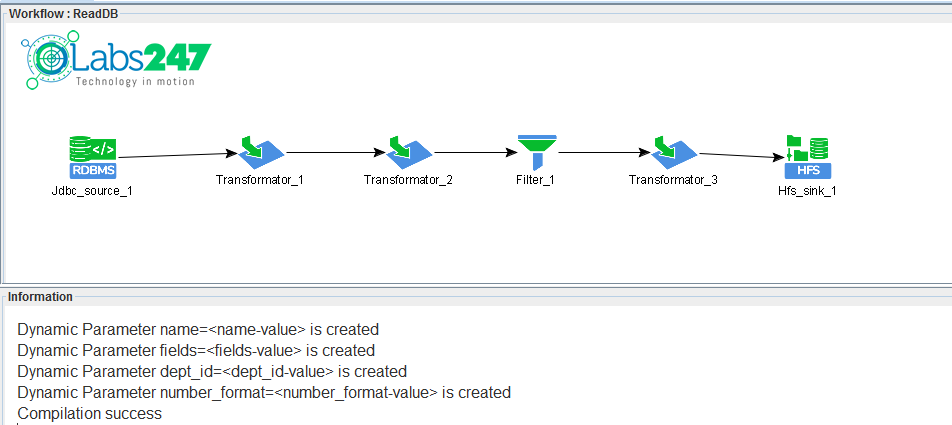
If the dynamic parameter is successfully created, the information will appear in the Information Window under the Workflow Window .
This window displays:
- parameter list
- status parameter
- workflow configuration information
Dynamic Parameter Shortcut
To quickly enter dynamic parameter text:
FROM_ARGUMENT(param_name)
Press the button:
F3
on textboxes that support dynamic parameters.
Advantages of Dynamic Parameter
The use of dynamic parameters provides several advantages:
- More flexible workflow
- Parameters can be changed without editing the workflow.
- Workflows can be reused for various needs
- Supports job automation via script or scheduler
