Workflow Faces Similarity in HGrid247-3.5
Purpose
This workflow is used to:
- Calculating the level of facial similarity
- Identify whether two images contain the same person
- Sort results by highest facial similarity
In contrast to ordinary image similarity , here the focus is only on the facial area (face region) .
Concept Face Similarity
The main process consists of 3 stages:
- Face Detection → detects faces in images
- Feature Extraction → extracting facial features
- Similarity Matching → comparing faces
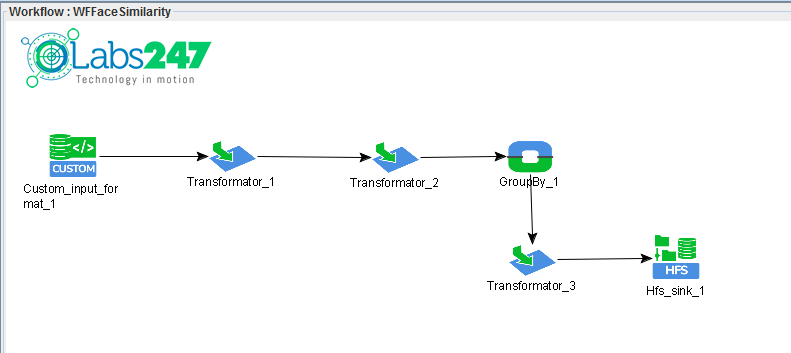
Step 1 – Copy Workflow
From the previous workflow:
WFImageSimilarity
Copy to:
WFFaceSimilarity
 Purpose
:
- reuse pipeline
- just replace the similarity method
Step 2 – Transformator_2 Modification
On Transformator_2 :
Delete function:
ImageSimilarity
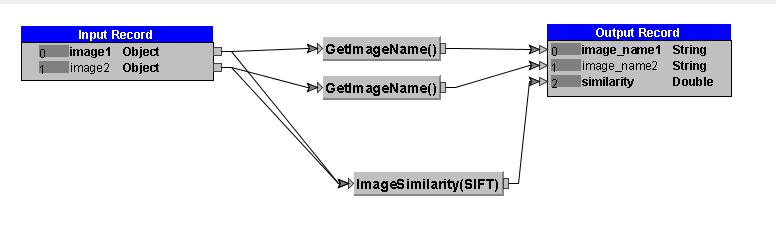
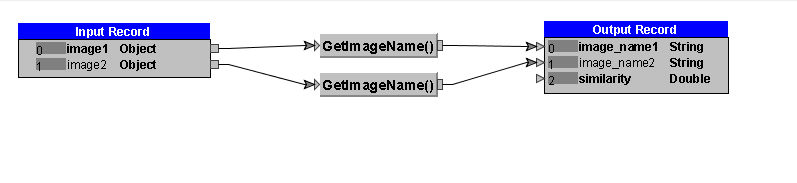
Because it will be replaced with a special one for the face
Step 3 – Adding FaceSimilarity
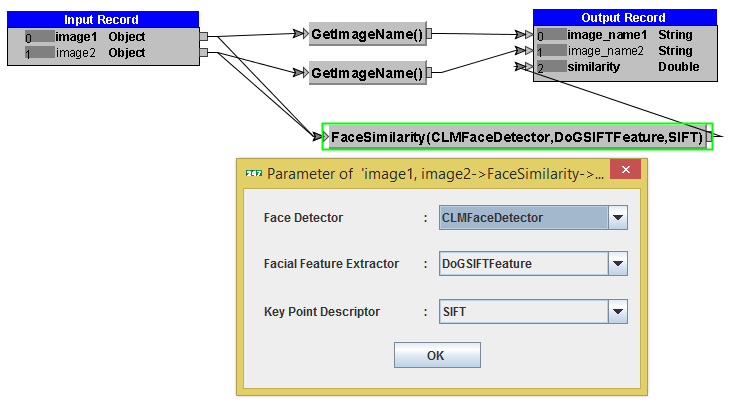
Add function:
FaceSimilarity
Input-output relationship:
    image1 ─┐
            ├── FaceSimilarity ──> similarity
    image2 ─┘
Important Parameters
1. Face Detector
CLMFaceDetector
Function:
- detecting face position in an image
- ensure that only the facial area is processed
2. Facial Feature Extractor
DoGSIFTFeature
Function:
- extract important facial features
- such as eyes, nose, mouth
3. Key Point Descriptor
SIFT
Function:
-
compare facial features between images
Step 4 – Compile Workflow
Click the button:
Generate ( )
)
Output:
workshop_mr.jar
Step 5 – Running on Hadoop
Run on an Apache Hadoop cluster :
hadoop jar workshop_mr.jar workshop.WFFaceSimilarity photo output_fsim photo/photo1.jpg
Parameter
    Parameter       Description
    ------------------------------------
    photo           facial image dataset
    output_fsim     results folder
    photo1.jpg      reference face
Sample Output
    photo/photo1.jpg        photo/photo1.jpg        1.0
    photo/photo1.jpg        photo/photo5.jpg        0.7046571656156865
    photo/photo1.jpg        photo/photo7.JPG        0.6650472587046466
    photo/photo1.jpg        photo/photo2.jpg        0.3304030217553085
    photo/photo1.jpg        photo/photo4.jpg        0.3246716833058123
    photo/photo1.jpg        photo/photo3.jpg        0.3175215036337799
    photo/photo1.jpg        photo/photo6.jpg        0.032529146286689375
Interpretation of Results
    Similarity Value        Meaning
    -----------------------------------------
    1.0                     identical faces
    > 0.7                   very similar
    0.3 – 0.7               quite similar
    < 0.1                   not similar
Note : The file of workflow WFFaceSimilarity can be found in the following link :
WFFaceSimilarity.csd
