EndsWithPatternInputFormatExcel is used to parse an MS Excel file where the end of each record is identified by a specific
regular expression pattern.
Configuration
The configuration consists of the following parameters:
- hgrid247.record.endPattern
Indicates the regular expression pattern that marks the end of a record.
- hgrid247.excel.sheet2process
Indicates which Excel sheet will be processed.
- Default value: the first sheet
- To process all sheets, set the value to "all"
- hgrid247.excel.columndelimiter
Indicates the column delimiter used in the output.
- hgrid247.record.patternFlag
Indicates the regular expression pattern flag.
- Default value: MULTILINE
- Multiple flags can be specified using the | separator
Example
Excel Spreadsheet Content
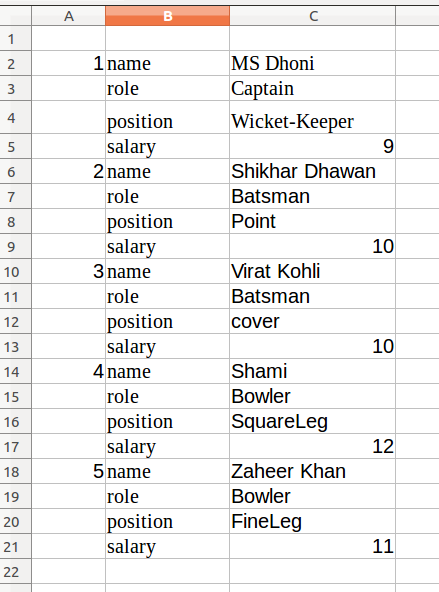
Configuration Used
| Configuration Name | Configuration Value |
| hgrid247.excel.sheet2process | all |
| hgrid247.excel.columndelimiter | , |
| hgrid247.record.endPattern | ,\\d+\\n |
Result
Record 1 :
1,name,MS Dhoni
,role,Captain
,position,Wicket-Keeper
,salary,9
Record 2
2,name,Shikhar Dhawan
,role,Batsman
,position,Point
,salary,10
Record 3
3,name,Virat Kohli
,role,Batsman
,position,cover
,salary,10
Record 4
4,name,Shami
,role,Bowler
,position,SquareLeg
,salary,12
Record 5
5,name,Zaheer Khan
,role,Bowler
,position,FineLeg
,salary,11
Behavior
- Reads Excel files row by row
- Accumulates rows into a record until the end-pattern is matched
- Outputs each detected record as a single unit
- Columns are separated using the configured column delimiter
Typical Use Cases
- Parsing hierarchical or multi-line records stored in Excel files
- Processing Excel-based transaction or form-style data
- Grouping related Excel rows into logical records for ETL workflows
