
|
|
Main Features of HGrid247-3.5 DE |
Main Window Of HGrid247-3.5 DE
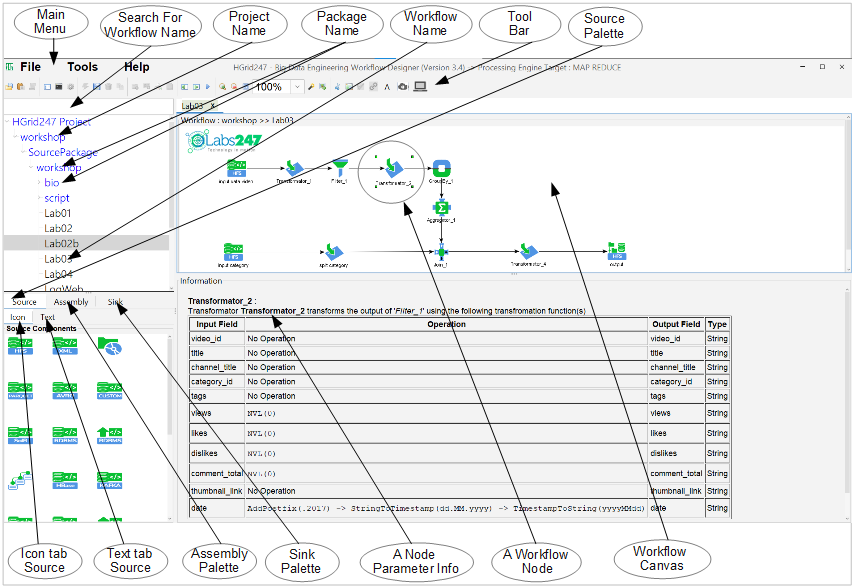
Components of HGrid247-3.5 DE Window
The HGrid247-3.5 Data Engineering (DE) Window provides the main workspace used to design, manage, and execute data processing workflows.
The interface contains several components that help users create ETL/ELT pipelines visually.
1. Operators of HGrid247-3.5 DE Workflow
Operators are individual processing units in a workflow that perform specific tasks or transformations on data.
- Source
A Source is the starting operator of a workflow. It reads or ingests raw data from external systems or storage.
Sources are responsible for bringing data into the processing pipeline.
- Assembly
An Assembly is a data processing operator that performs specific transformations or operations on data.
Assemblies are used to:Assemblies are placed between Source and Sink operators in the workflow.
- transform data
- filter records
- aggregate information
- enrich datasets
- perform intermediate processing
- Sink
A Sink is the final operator in a workflow where processed data is stored or delivered.
The Sink represents the destination of the data pipeline.
After the data reaches a Sink, the workflow process is considered complete.2. HGrid247-3.5 DE workflow
An HGrid247-3.5 DE Workflow is a visual diagram that describes how data flows through the system.
The workflow illustrates the movement of data:Source → Assembly → SinkA workflow may contain multiple sources, assemblies, and sinks depending on the complexity of the pipeline.Workflow Rules
There are several structural rules for creating workflows in HGrid247:These rules ensure that data processing pipelines are logically structured and executable.
- Every workflow must start with a Source.
- Every Source must be followed by an Assembly.
- Every Assembly must be followed by:
- another Assembly, or
- a Sink.
- Every Sink must be preceded by an Assembly.
3. Menu in HGrid247-3.5 DE Window
The Menu Bar contains several main menus that provide access to system functions and project management features.4. Pop Up Menu in HGrid247-3.5 DE
The Tools menu provides utilities for configuring and managing the system environment.