Atlas Client Configuration (HGrid247-3.5)
Atlas Client Configuration is a feature in HGrid247-3.5 that is used to connect workflows with metadata management systems .
This system utilizes:
- Apache Atlas
- Apache Hadoop ecosystem
Its purpose is to record the lineage (data flow) of Big Data processes such as MapReduce .
Parameter Atlas Client
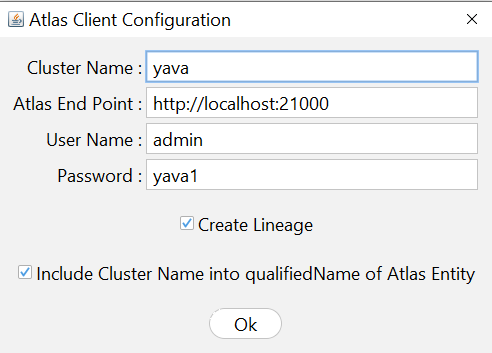
The following parameters must be configured on the Atlas Client.
- Cluster Name :
This parameter contains the username to login to Apache Atlas.
This name usually corresponds to the name of the Hadoop cluster .
- Atlas End Point :
Indicates the url of Apache Atlas service.
- Atlas End Point :
Atlas End Point is the URL of the Apache Atlas service.
Example:
http://localhost:21000
or
http://atlas-server:21000
Port 21000 is the default port of Atlas.
- User Name :
Indicates the user name to login Apache Atlas service.
- Password :
This parameter contains the Atlas user password .
Used for Atlas API authentication.
- Include Cluster Name into qualifiedName of Atlas Entity :
This parameter determines whether the cluster name is included in the attributes qualifiedName on the Atlas entity.
If enabled, the cluster name will be part of the identifier.
Example qualifiedName:
hdfs://yava.solusi247.com:8020/user/root/input/bdt@Yava
Explanation:
- bdt → dataset name
- Yava → cluster name
This is important if the organization has more than one Hadoop cluster .
- Create Lineage :
This parameter determines whether the lineage class will be created during the MapReduce workflow build process .
If enabled:
- class lineage will be generated
- lineage can be sent to Apache Atlas when the job is run
Example of running a job with lineage:
hadoop jar file.jar class-to-execute param1 param2 lineage=true
With parameters:
lineage=true
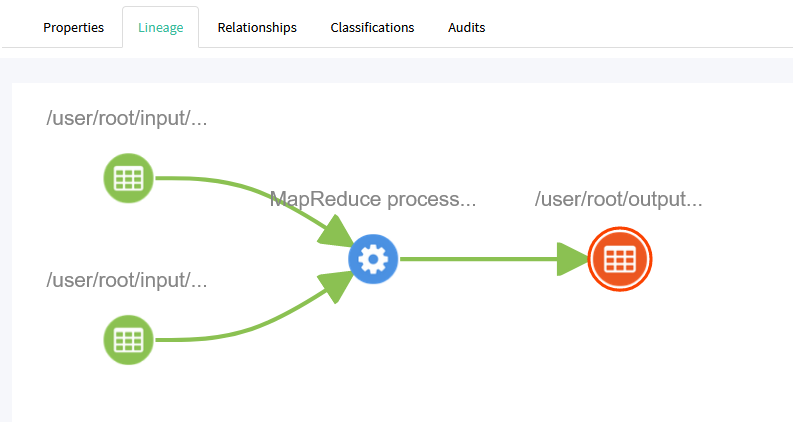
then the system will send data processing information to Atlas .
If the lineage is successfully created, then the Apache Atlas UI will show data relationships like:
Creating an Atlas Type hgrid247_process
In order for HGrid247 to record lineage, we need to create a custom type in Atlas called:
hgrid247_process
This type is used to represent HGrid247 workflows in Atlas .
How to Make an Atlas Type
The type is created by running the following class:
com.solusi247.atlas.lineage.AtlasHGrid247Type
Command:
java -cp <atlas-library-path> com.solusi247.atlas.lineage.AtlasHGrid247Type <endPoint> <user> <password>
Example Command
java -cp addlib/atlas/* com.solusi247.atlas.lineage.AtlasHGrid247Type http://localhost:21000 admin yava123
Parameter explanation:
    Parameter                                       Description
    ---------------------------------------------------------------------
    addlib/atlas/*                                  library atlas location
    com.solusi247.atlas.lineage.AtlasHGrid247Type   Type in atlas
    http://localhost:21000                          atlas service address (end point)
    admin                                           username atlas
    yava123                                         password atlas
Type Creation Results
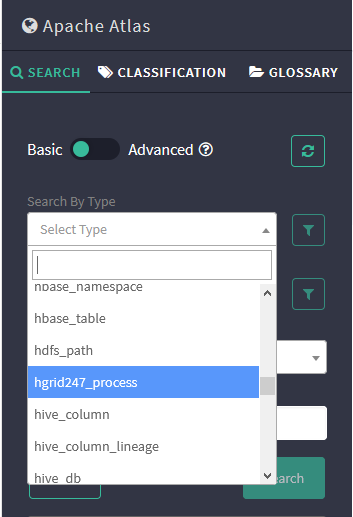
After the command is executed, a new type will appear in the Types menu at:
The types are:
hgrid247_process
This type is used to record:
- workflow HGrid247
- MapReduce process
- input and output dataset