Explore and Operate on File System and HDFS (HGrid247-3.5)
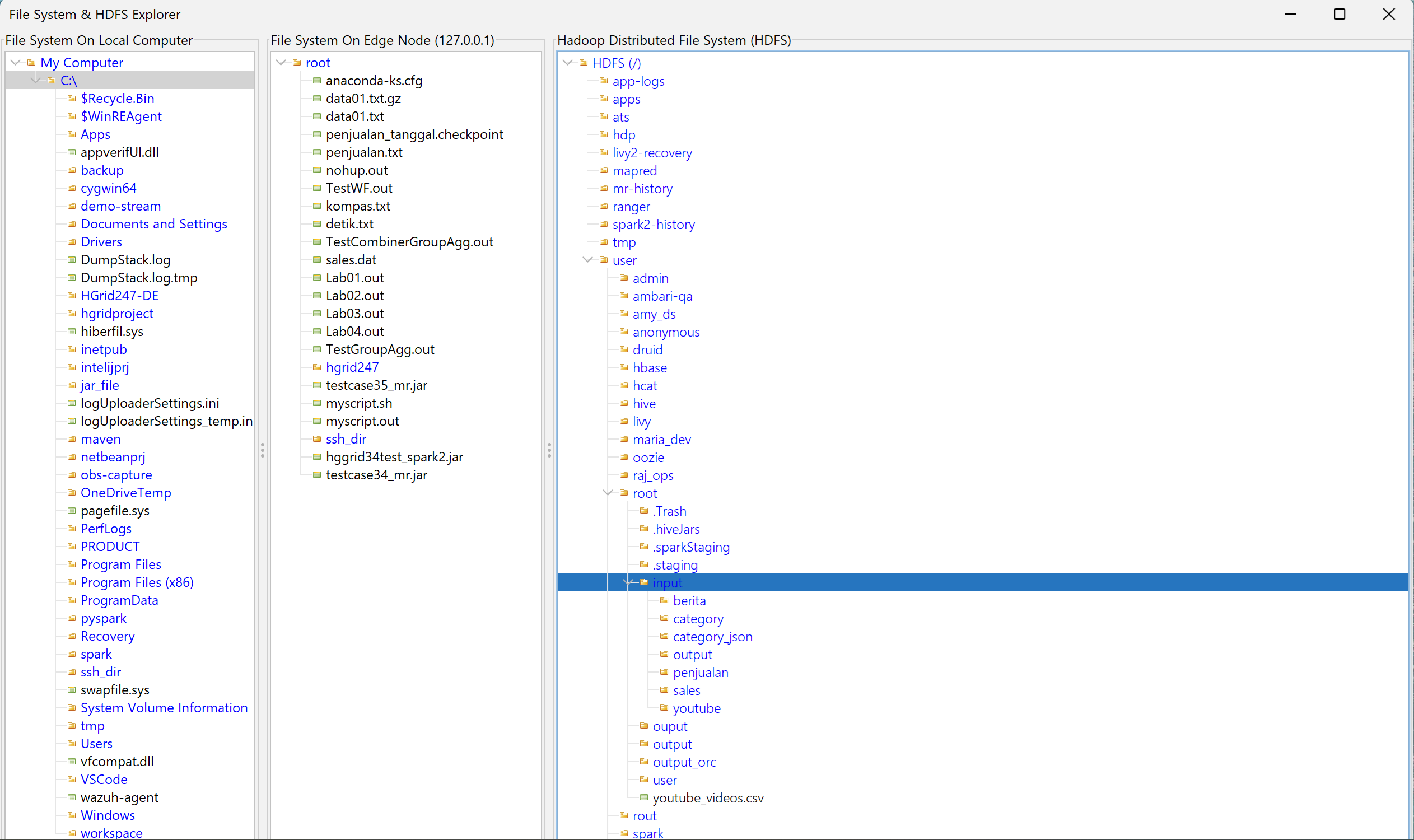
The File System & HDFS Explorer feature on HGrid247-3.5 is used to explore and manage files in three environments at once , namely:
- Local Machine
- Hadoop Client (Edge Node)
- Hadoop Distributed File System
HDFS is part of the storage system in Apache Hadoop .
Explorer View Structure
The explorer view is divided into three main panels .
    Panel               Description
    --------------------------------------------------------------
    Left Panel          File System on local computer (Desktop / Laptop)
    Middle Panel	File System on Hadoop Client / Edge Node
    Right Panel         File System on HDFS
Operations on File System and HDFS
The following operations can be performed on the explorer.
- Expand a directory
To open the contents of a folder.
Steps:
- Double click on the directory.
- The contents of the directory will be displayed.
- Create a directory
Used to create new folders.
Steps:
- Click the parent directory
- Right click
- Select Make Directory
- Enter the folder name.
- Delete a directory
Used to delete folders.
Steps:
-
Click folder
- Right click
- Select Remove Directory
- Cat a file
The cat command is used to display the entire contents of a file .
Steps:
- Click File
- Right click
- Choose cat
- Head a file
The head command is used to display the first few lines of a file .
Steps:
- Click File
- Right click
- Choose a head
- Tail a file
The tail command is used to display the last few lines of a file .
Steps:
- Click File
- Right click
- Select tail
- Delete a file
Used to delete files.
Steps:
- Click File
- Right click
- Select tail
- Upload a file from Local to Edge Node
Used to send files from the local computer to the edge node .
Steps:
- Select file on Local Machine
- Drag file
- Drop ke folder pada Hadoop Client (Edge Node)
- Upload a file from Edge Node to HDFS
Used to send files from edge nodes to HDFS .
Steps:
- Select file on Hadoop Client
- Drag file
- Drop to folder on HDFS
- Upload file from Local to HDFS
Used to send files directly from local computer to HDFS .
Steps:
- Select file from Local Machine
- Drag file
- Drop to folder on HDFS
- Download a file from Edge Node to Local
Used to retrieve files from edge nodes to local computers .
Steps:
- Select file from Edge Node
- Drag file
- Drop to folder Local Machine
- Download a file from HDFS to Edge Node
Used to fetch files from HDFS to edge nodes .
Steps:
- Select files from HDFS
- Drag file
- Drop to folder Edge Node
- Download a file from HDFS to Local
Used to fetch files from HDFS directly to local computer .
Steps:
- Select files from HDFS
- Drag file
- Drop to folder Local Machine