Parameter Hadoop Cluster Client (HGrid247-3.5)
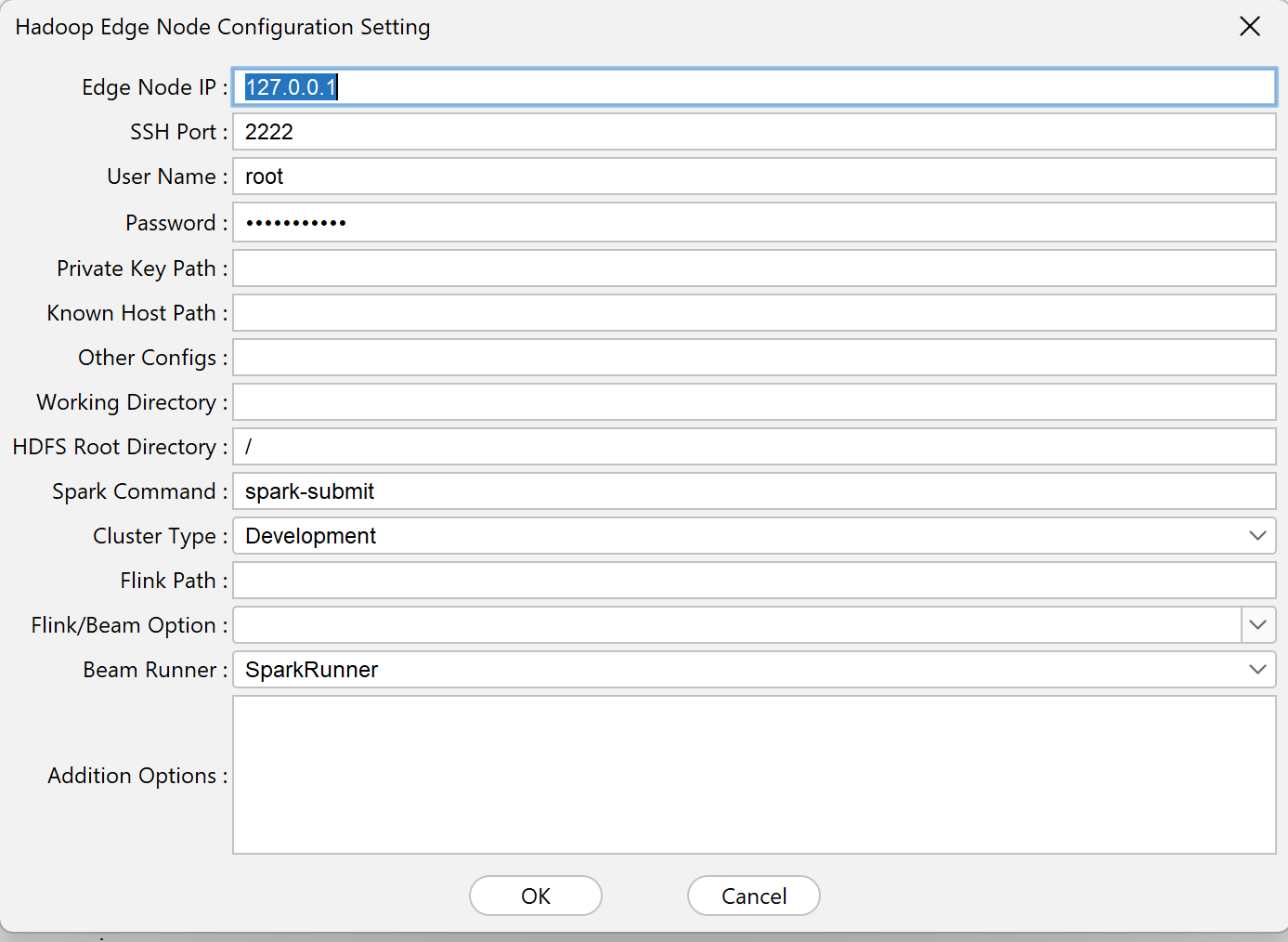
The Hadoop Cluster Client Settings menu on HGrid247 is used to configure the connection between HGrid247 and the edge nodes in the Hadoop cluster .
This configuration is required before running workflows on the cluster.
The following is an explanation of each parameter.
1. Edge Node IP
Node IP is the IP address of the Hadoop cluster client (edge node) .
Edge nodes are machines used to:
- send jobs to the edge node
- running Hadoop/Spark/Flink commands
- access file system in edge node
- access HDFS
Example:
Node IP = 192.168.1.20
2. Port
Port is the port number used for SSH connections to the edge node .
Usually use standard SSH ports:
22
3. User Name
User Name is the username used to log in to the edge node of the Hadoop cluster server .
Example:
User Name = hadoop
4. Password
The password is used to authenticate login to the cluster server if not using an SSH key.
5. Private Key Path
Private Key Path is the location of the SSH private key file used for passwordless login.
Example:
/home/user/.ssh/id_rsa
Private keys are usually paired with public keys on the server cluster.
6. Known Host Path
Known Host Path is a file that contains a list of hosts that have been connected via SSH .
Example:
/home/user/.ssh/known_hosts
This file is used for SSH connection security validation .
7. Other Configs
The Other Configs parameter is used for additional SSH configuration in the form of:
key=value
Example configuration:
StrictHostKeyChecking=no,PreferredAuthentications=publickey
This configuration is typically used for:
- authentication settings
- SSH connection security settings
8. Working Directory
Working Directory is a folder on the edge node used to store:
- file jar build result
- execution script
- temporary file
Example:
hgrid247
When the workflow is run, the JAR file will be sent to this directory.
/home/hgrid247
9. HDFS Root Directory
HDFS Root Directory is the root directory of the Hadoop Distributed File System (HDFS) that will be displayed in HDFS Explorer.
Example:
/
10. Spark Command
Spark Command is a command used to run jobs on the engine:
Apache Spark
Usually use:
spark-submit
11. Cluster Type
Cluster Type determines the type of cluster used.
Options:
    Type            Description
    --------------------------------------------------------
    Development     workflow execution results are displayed
    Production      output is only stored in the cluster
If using Development , HGrid247 will display the job results in the standard output.
12. Flink Path
Flink Path is the location of the flink command on the cluster server.
Used when running workflows using the engine:
Apache Flink
Example:
/usr/local/flink/bin/flink
13. Flink / Beam Options
This parameter contains additional options for running the workflow on Flink or Apache Beam .
Example:
-m yarn-cluster
Used to determine the execution mode.
14. Beam Runner
Beam Runner determines the runner used by:
Apache Beam
Example runner:
    Runner              Description
    DirectRunner	run locally
    SparkRunner         run on Spark
    FlinkRunner         run on Flink
15. Addition Options
Additional Options are additional parameters sent when running a job on a cluster.
Example:
    --executor-memory 4G
    --num-executors 2
Typically used to regulate:
- memory executor
- number of executors
- resource cluster