Building Jar Library Option (HGrid247-3.5)
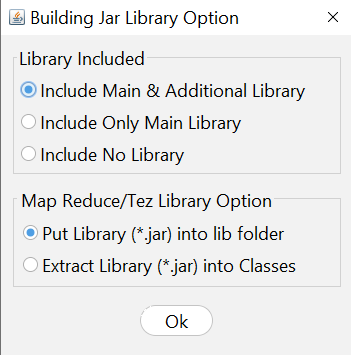
The Building Jar Library Option feature in HGrid247-3.5 is used to determine how to include libraries in the JAR file resulting from the workflow compilation .
This library is required when the workflow is run on Big Data engines such as:
- Apache Hadoop Map Reduce
- Apache Tez
- Apache Spark
- Apache Flink
- Apache Beam
This setting is important because it affects:
- JAR file size
- how dependencies are loaded
- compatibility with cluster libraries
1. Library Included Option
This section determines which libraries are included in the JAR file .
There are three options.
1. Include Main & Additional Library
All libraries will be included in the JAR file.
Including:
- main library
- additional library
Example:
workflow.jar
Containing:
workflow classes
    main libraries
    additional libraries
Advantages:
- the application can run without external dependencies
- suitable for standalone deployment
Disadvantages:
2. Include Only Main Library
Only the main library is included in the JAR file.
Additional libraries are not included.
Example structure:
    workflow.jar
     ├─ workflow classes
     └─ main libraries
Advantages:
- smaller JAR size
- additional dependencies can be set externally
Usually used if the cluster already provides additional libraries.
3. Include No Library
No libraries are included in the JAR file.
The JAR structure contains only:
workflow classes
Advantages:
Disadvantages:
-
all dependencies must be available on the cluster.
2. MapReduce / Tez Library Option
This section defines how libraries are stored in a JAR when using the MapReduce or Tez engine .
Related engines:
There are three options.
1. Put Library (*.jar) into lib folder
The library will be placed in the lib folder in the JAR file.
Example structure:
    workflow.jar
     ├─ classes
     └─ lib
         ├─ mysql.jar
         ├─ redis.jar
         └─ other-library.jar
Advantages:
- neater structure
- dependencies are separated from the main class
2. Extract Library (*.jar) into Classes
The library will be extracted into class files directly inside the classes folder .
Example structure:
workflow.jar
     ├─ classes
     │   ├─ workflow classes
     │   ├─ library classes
     │   └─ dependency classes
Recommendation:
If a MapReduce or Tez job is run using a scheduler , such as:
then it is recommended to use this option .
Because the scheduler often requires dependencies to be in one classpath .
3. Include No Library
There are no libraries included in the JAR.
All dependencies must be available in the cluster environment.
Example:
    workflow.jar
     └─ workflow classes only
Usually used on production clusters that already have a complete library.
Library Options Comparison
    Option                              Description                     Advantages
    ------------------------------------------------------------------------------
    Include Main & Additional Library	All libraries are included	Easy to deploy
    Include Only Main Library           Only the main library           Smaller JAR
    Include No Library                  No library                      Relying on cluster dependency
MapReduce / Tez Library Option Comparison
    Option                              Description
    -------------------------------------------------------------------
    Put Library into lib folder         Libraries are stored as JAR files
    Extract Library into Classes	Library extracted into class
    Include No Library                  No library
Recommended Use
    Scenario                Recommended Option
    -------------------------------------------------------
    Development             Include Main & Additional Library
    Production Cluster      Include Only Main Library
    Oozie Scheduler         Extract Library into Classes