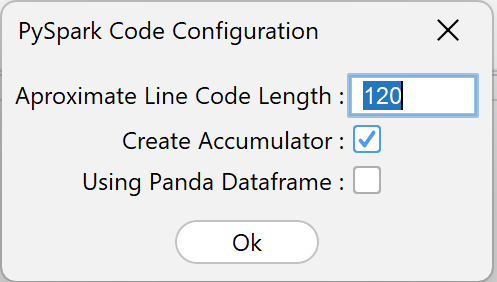
1. Approximate Line Code Length
This parameter specifies the approximate maximum number of characters in a single line of PySpark code .
The main functions of this parameter are:
- maintain code readability
- avoid overly long lines of code
Example configuration:
Approximate line code length = 120
It means:
-
each line of code will be limited to approximately 120 characters
Example before formatting:
df = spark.read.format("csv").option("header","true").option("delimiter",",").load("hdfs://data/input/youtube_video.csv")
Example after setting line length:
    df = spark.read.format("csv") \
        .option("header","true") \
        .option("delimiter",",") \
        .load("hdfs://data/input/youtube_video.csv")
This parameter does not affect performance, but affects the structure of the generated code .
2. Create Accumulator
The Create Accumulator parameter is used to add a Spark Accumulator to the generated PySpark code.
Accumulator is a feature on:
Apache Spark
which is used to calculate global values during the cluster execution process .
If this parameter is enabled, then HGrid247 will create accumulators for:
- record the number of records
- create a transformation process log
- pipeline execution monitoring
Advantages of using accumulators:
- facilitate job monitoring
- help debugging pipeline
- record the number of records processed
3. Using Panda DataFrame
This parameter determines whether a particular operation uses a Pandas DataFrame or a Spark DataFrame .
Libraries used:
pandas
If enabled, then some operations such as:
- Combiner
- Aggregator
- TopN
- Buffer
- BufferTransformation
Difference between Spark DataFrame and Pandas DataFrame
    Feature         Spark DataFrame         Pandas DataFrame
    ---------------------------------------------------------
    Scalability     Big Data                Small Data
    Execution       Distributed             Single Machine
    Memory          Cluster Memory          Local Memory
    Speed           Slow for small data     Fast for small data
When to Use Pandas DataFrame
Using Pandas DataFrame is suitable if:
- relatively small dataset
- requires complex surgery
- analysis is done locally
However, if the dataset is large, it is better to still use Spark DataFrame .