⚠️ Error: import ... , symbol: variable ..., location: class ...
📌 Causes
This error appears when the compilation process cannot find the class or library required by the workflow.
Usually occurs because:
- Library is not activated yet
- File .jar not added yet
- Dependency is not available in the project
Example error message:
    import com.example.library....
    symbol: variable ....
    location: class ....
Meaning:
➡️ The compiler did not find the imported class.
🧩 Types of Error Causes
1. External Library Missing
If the class comes from an external library , then:
📁 Copy file .jar library to a sub-folder of the folder:
libApp
After that:
2. HGrid247 Internal Library is Not Active Yet
If the library comes from the HGrid247 built-in module:
Activate via menu:
File → Additional Library
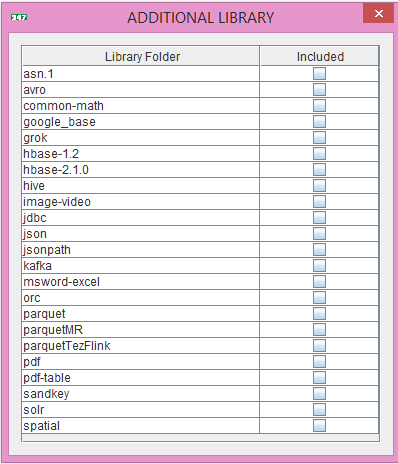
Then:
- Select the required library
- Click OK
- Recompile workflow
🔎 How to Check Required Libraries
Usually the error will show the package name, for example:
import grok....
Means need to activate:
grok library
Another example:
import jdbc....
Enable:
jdbc library
🔧 Repair Steps (Safe Order)
- View compile error message
- Identify the library name
- Determine whether:
- external library
- library internal HGrid247
- If external → copy .jar to sub-folder of the folder libApp
- If internal → enable in Additional Library
- Recompile workflow
