⚠️ Error: Class Not Found in JAR
📌 Causes
This error occurs because:
➡️ The required class is not included in the .jar build result file
Common causes:
- Library not yet included
- Dependency is not active during build
🧠 Error Example
It usually appears like:
java.lang.ClassNotFoundException
or
NoClassDefFoundError
🎯 Source of the Problem
1. External Libraries Not Included
➡️ If the class comes from an external library:
✔ Solution:
Copy file .jar to folder:
ext_lib
2. Internal Library Not Enabled
➡️ If the class comes from the HGrid247 built-in library:
✔ Solution:
Open the menu:
File → Additional Library
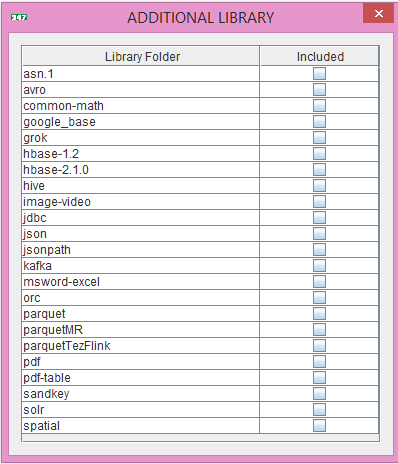
Check the required libraries (eg: JSON, JDBC, Grok, etc.)
✅ Solution Steps
🔧 Step-by-step
- Check class origin
- Internal → enable in Additional Library
- External → copy ke ext_lib
- Recompile workflow
🧩 Tips Debug
✔ If used:
- JSON → enable JSON library
- Database → enable JDBC
- Log parsing → enable Grok
✔ Check the error log → usually mentions the name of the missing class
